
How to migrate from Webflow to Next.js and Sanity
WebflowSanity
Export your Webflow CMS through the Data API, convert each rich text field to Portable Text with @sanity/block-tools, then import the result as NDJSON. The conversion silently deletes every image inside rich text unless you register a custom figure rule, so count images before and after. Budget half the project for the front end rebuild.
By Rajat Kapoor
Updated August 2026
Key takeaways
The default HTML to Portable Text conversion discards every image inside a rich text field. On a real post, ten images in produced zero images out, with no error.
Where an image had a caption, the caption survives as a stray line of text under the heading. Where it had none, the image leaves no trace, so word counts still look correct.
A custom deserialize rule for the figure element fixes it, and the schema has to allow an image member in that field or the block is dropped for a second reason.
Setting _sanityAsset to image@ plus the Webflow CDN URL makes Sanity fetch and store the file on import, so no upload script is needed. Do it before you cancel the Webflow plan.
A read-only CMS scope covers the export shown here, since the image URLs come from the CMS data and Sanity fetches the files itself. Only site administrators can create a token, and tokens expire after 365 consecutive days of inactivity.
Rebuilding the front end is roughly half the project. There is no tool that converts a Webflow design into a Next.js codebase worth maintaining.
Sanity’s free plan covers 20 seats and 10,000 documents, which most marketing sites fit inside. The real running cost is the developer a Webflow site did not require.
Every guide to this migration is written by somebody who will do it for you, which is why they are all arrival stories. Here is the stack, here is why it is better, here is our case study. None of them tells you what the conversion does to your content on the way.
So we ran it. We took a published Webflow post with ten images in the body, pushed it through the standard HTML to Portable Text conversion, and got 207 blocks back with zero images in them. No error, no warning. A spot check of the imported post looks fine until you scroll.
That is the part of this job that goes wrong quietly, so it gets the most space below. The rest is the walkthrough in the order you will actually work through it, and a version of the whole thing you can hand to a coding agent.
Should you do this at all
Some sites should stay on Webflow, and it is cheaper to find that out now.
Stay if your marketing team changes layouts, not just words. This is the big one. Webflow's promise is that somebody without a developer can move a section, add a testimonial band, or build a landing page on Friday afternoon. Next.js and Sanity give that back to the developer. Content edits stay self-serve, but anything structural becomes a pull request.
Stay if nobody owns the front end after launch. A Webflow site with no developer is a site that still works. A Next.js site with no developer is a dependency graph quietly rotting. If you cannot name the person who will upgrade it in eighteen months, you are choosing a maintenance burden over a subscription.
Stay if the site's value is in the Designer. Sites with heavy scroll work, interactions and one-off layouts are expensive to rebuild and easy to make worse. You are not migrating those, you are commissioning them again.
Move if your content needs to be in more than one place. That is the honest reason to do this. Once the same content has to feed a website, a product surface, an email system and maybe a mobile app, a page builder is the wrong shape and a content API is the right one. Structured, typed, versioned content that several front ends can read is something Webflow's CMS was never built to be.
Move if you are running into the CMS limits, if you want your content model in code review, or if you already have developers and the deploy step costs you nothing.
What you lose
Worth reading before you price anything, because none of it comes back.
Visual editing. Sanity has live preview and click to edit, and both are good. Neither is a canvas. Nobody drags a section on a Sanity site.
The Designer's responsive work. Webflow gives you breakpoints and sensible defaults for free. In a rebuild, every one of those is now somebody's job.
The gap between an idea and a live page. Publishing in Sanity is immediate, but how quickly the website reflects the change depends on your Next.js caching and revalidation setup. Publishing a layout now means a branch, a review and a deploy.
Everything Webflow bundled. Hosting, CDN, forms, form storage, SEO fields, redirects, SSL and the staging environment all arrive in one subscription. After the move you are assembling those from a host, a forms service and your own code. Each piece is usually better. There are more of them.
The migration, step by step
Ten steps. The order matters, and step 1 is the one people skip.
1. Model the content before you touch anything
Do not start by exporting. Start by deciding what the content should look like when it arrives, because a straight field for field copy is the most common way this migration produces a worse CMS than the one it replaced.
Webflow Collections are flat. Every field is a column, references point at other Collections, and structure that does not fit becomes either a rich text blob or a numbered set of fields called Feature 1, Feature 2, Feature 3. Sanity has arrays and nested objects, so the things you worked around in Webflow can be modelled properly.
Open a Collection's settings and you get the whole shape on one screen, with each field's type next to it.
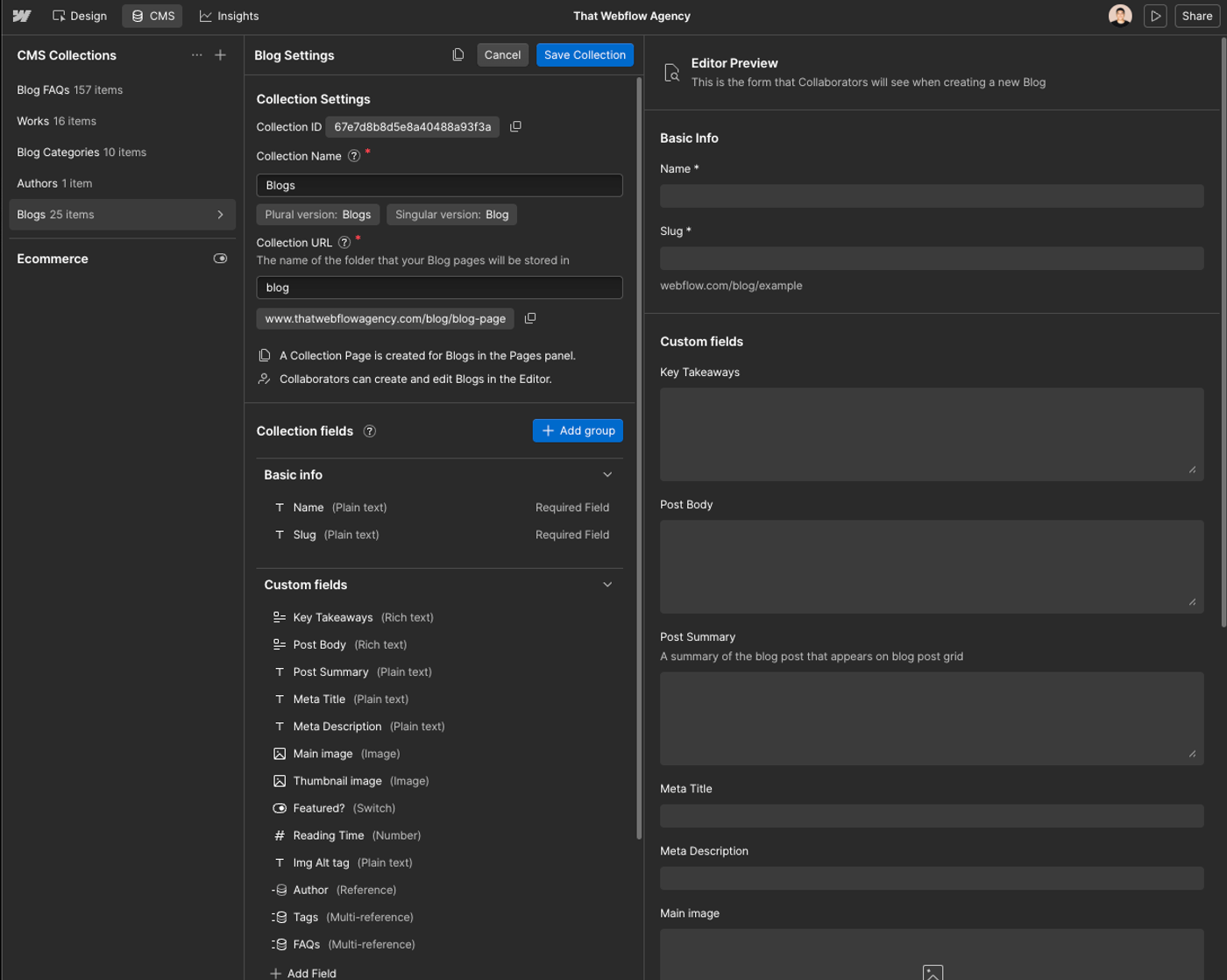
The types map cleanly, with one exception:
Webflow                Sanity
---------------------  ----------------------------------
Plain text             string, or text for multi-line
Rich text              array of block  ← the hard one
Image                  image
Multi-image            array of image
Video link             url, or a custom object
Link / Email / Phone   url / string
Number                 number
Date/Time              datetime
Switch                 boolean
Color                  string
Option                 string with a list of options
Reference              reference
Multi-reference        array of reference
File                   file
Rich text is the exception, and steps 5 and 6 are about it.
While you are on that screen, copy the Collection ID. You need it for every API call.
Two questions worth answering now. First, which of your rich text fields are actually structured content pretending to be prose? A Post Body full of repeating heading, image and bullet groups is a case for an array of typed blocks, not one long HTML field. Second, which fields exist only because Webflow made you flatten something? Those are the ones to fix while you have the chance.
2. Stand up Next.js and Sanity
Get the destination working with fake content before you touch the real content.
npx create-next-app@latest my-site
cd my-site
npm create sanity@latest -- --template clean --create-project "My Site" --dataset production
That gives you a Sanity project and an embedded Studio at `/studio`, which is the arrangement you want. The Studio ships with the site, so previews run against whatever origin is serving the app and there is no second deployment to keep in sync.
Write your schemas from the model you built in step 1, then create a second dataset to import into so your first attempt is not also your production data:
npx sanity dataset create staging3. Get a Webflow API token
Site settings, then Apps & integrations, then scroll to the bottom of the page to API access, then Generate API token.
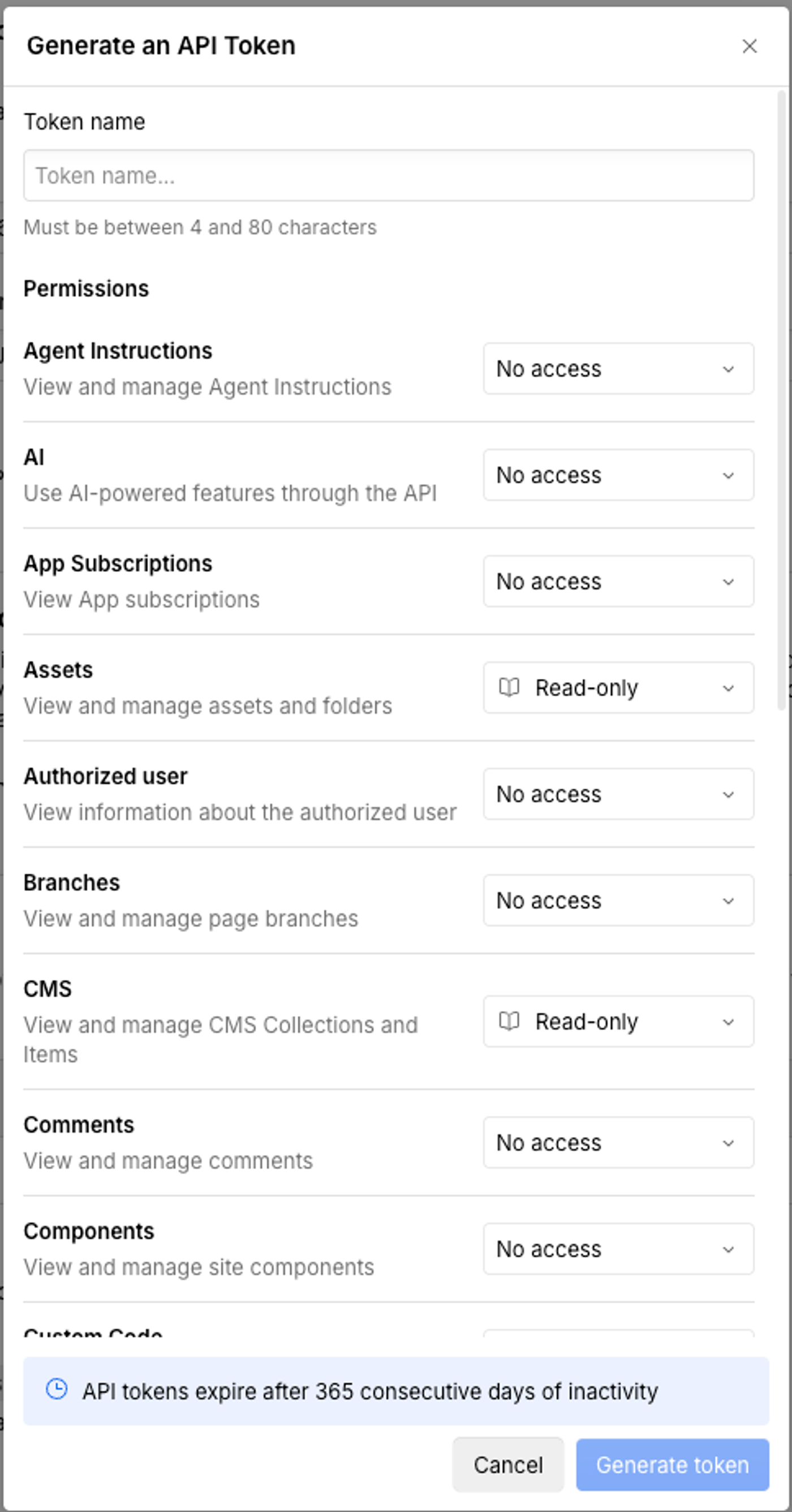
Four things the docs do not put in front of you:
- Permissions are per-scope dropdowns with three settings, not checkboxes. For the CMS export shown here, CMS: Read-only is sufficient, because the image URLs arrive inside the CMS field data and Sanity fetches the files from those URLs itself. Add Assets: Read-only only if your migration script needs to query Webflow's Assets API directly. Either way, do not grant write access to a token whose only job is to read.
- Only site administrators can create one. If the button is not there, that is why.
- A site can hold up to five tokens.
- Tokens expire after 365 consecutive days of inactivity, and any call resets the clock. A token you generate for a migration and leave in a `.env` file will quietly stop working roughly a year later.
Webflow does not document a site plan requirement for Data API access. In practice the question rarely comes up, because a site with CMS content to migrate already has a plan that supports the CMS.
4. Export the CMS
One endpoint does the work: list collection items.
const TOKEN = process.env.WEBFLOW_TOKEN
const API = 'https://api.webflow.com/v2'

async function wf(path) {
  const res = await fetch(`${API}${path}`, {
    headers: { Authorization: `Bearer ${TOKEN}`, accept: 'application/json' },
  })
  if (res.status === 429) {
    const wait = Number(res.headers.get('retry-after') ?? 60)
    console.warn(`rate limited, waiting ${wait}s`)
    await new Promise((r) => setTimeout(r, wait * 1000))
    return wf(path)
  }
  if (!res.ok) throw new Error(`${res.status} ${await res.text()}`)
  return res.json()
}

export async function allItems(collectionId) {
  const items = []
  let offset = 0
  for (;;) {
    const page = await wf(`/collections/${collectionId}/items?limit=100&offset=${offset}`)
    items.push(...page.items)
    if (items.length >= page.pagination.total) break
    offset += 100
  }
  return items
}
The limit is 100 per request and pagination is by offset, so a 212 post blog is three calls. Rate limits are 60 requests a minute on the lower site plans and 120 on the higher ones, which no sane export will reach, but handle the 429 anyway because the retry costs four lines. Webflow returns `X-RateLimit-Remaining` and `Retry-After` when you get close.
One caution. Webflow's rate limit reference still names plan tiers that were retired in May 2026, so check which plan you are on in Site settings rather than reading it off that table.
Save the raw JSON to disk before you transform anything. You want to be able to re-run the conversion twenty times without hitting the API again.
5. Convert the rich text
Here is the part every other guide waves through.
Webflow stores a rich text field as an HTML string. Sanity stores rich text as Portable Text, an array of typed blocks. The standard bridge is `htmlToBlocks` from `@sanity/block-tools`, and out of the box it does this:
import { htmlToBlocks } from '@sanity/block-tools'
import { Schema } from '@sanity/schema'
import { JSDOM } from 'jsdom'
import schemas from '../sanity/schemaTypes/index.js'

const compiled = Schema.compile({ name: 'default', types: schemas })
const blockContentType = compiled
  .get('post')
  .fields.find((f) => f.name === 'body').type

export const toBlocks = (html) =>
  htmlToBlocks(html, blockContentType, {
    parseHtml: (h) => new JSDOM(h).window.document,
  })
`parseHtml` is required in Node, because the library expects a DOM and Node does not have one.
Run that against a real post and most of it is fine. On the post we tested, a 22KB body, every one of 190 bold spans survived as a `strong` mark, all 106 list items survived with their nesting levels intact, and all 13 links survived as `markDefs`.
Every image was deleted.
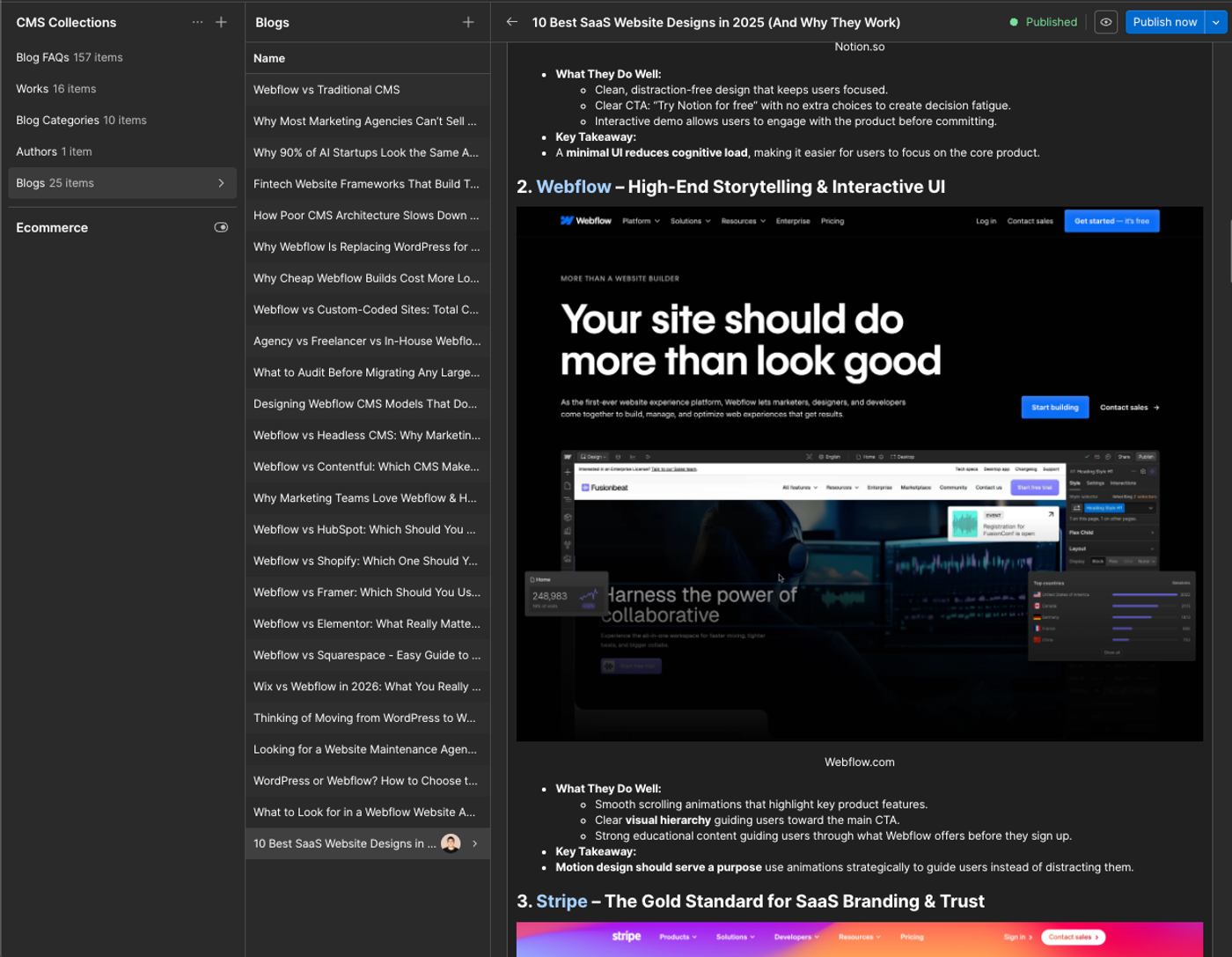
Ten images in, zero out. Webflow wraps rich text images like this:
<figure class="w-richtext-align-fullwidth w-richtext-figure-type-image">
  <div><img src="https://cdn.prod.website-files.com/.../Notion.avif"></div>
  <figcaption>Notion.so</figcaption>
</figure>
There is no default rule for that shape, so the `<figure>` is walked for text, the `<img>` contributes none, and the block is emitted as whatever text it found. Where there was a caption you get an orphan line of text sitting under the heading. Where there was no caption, the image leaves no trace at all. Two of our ten figures left a caption behind. The other eight vanished silently.
Before:
After, rendered from the actual converted blocks:
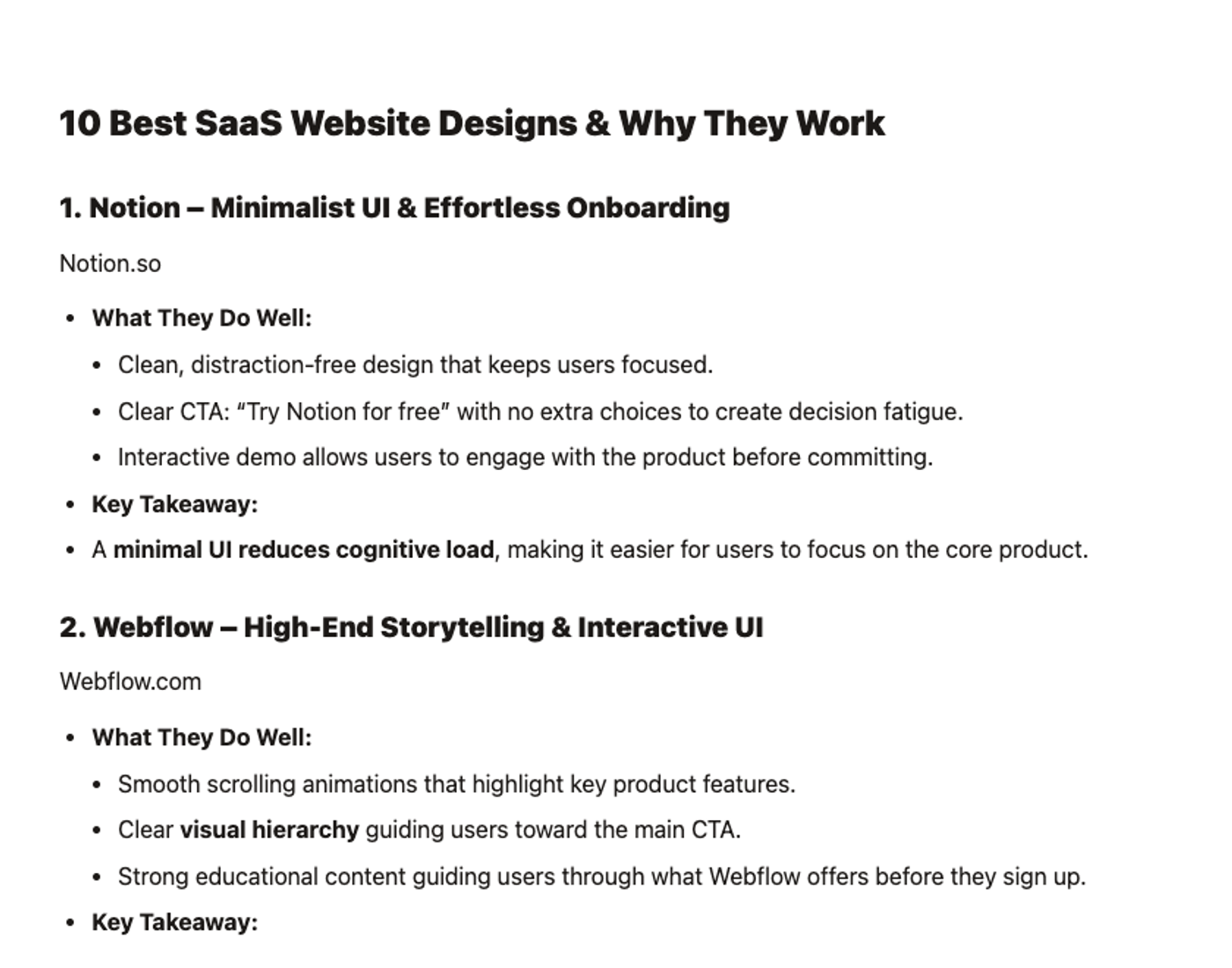
This is why you convert into a scratch dataset and open a few posts. Word counts will look right. Headings will look right. The images are just not there.
The fix is a custom `deserialize` rule that catches the figure before the default handling does:
const rules = [
  {
    deserialize(el, next, block) {
      if (el.tagName?.toLowerCase() !== 'figure') return undefined
      const img = el.querySelector('img')
      if (!img) return undefined
      const src = img.getAttribute('src')
      if (!src) return undefined
      return block({
        _type: 'image',
        _sanityAsset: `image@${src}`,
        alt: img.getAttribute('alt') || '',
        caption: el.querySelector('figcaption')?.textContent?.trim() || undefined,
      })
    },
  },
]

export const toBlocks = (html) =>
  htmlToBlocks(html, blockContentType, {
    rules,
    parseHtml: (h) => new JSDOM(h).window.document,
  })
Two things to know about that rule. Your schema has to allow an image member in the field, or the block is dropped again for a different reason. And `_sanityAsset` is doing something worth understanding, which is step 6.
One more failure worth checking for, because it does not always happen. Text styled with `<span style="font-weight:700">` or `font-style:italic` converts to plain unmarked text, and no rule catches it by default. The post we tested had none, so this depends on how the content got into Webflow rather than on Webflow itself. Grep your export for `span style` before you assume you are clear, and if you find any, Sanity documents the decorator rule that fixes it.
6. Move the images
You do not need an upload script. The `_sanityAsset` field in the rule above tells Sanity's importer to fetch the file itself:
{ "_type": "image", "_sanityAsset": "image@https://cdn.prod.website-files.com/.../Notion.avif" }On import, Sanity downloads that URL, stores the file, deduplicates it against anything identical already in the dataset, and replaces the field with a real asset reference. We tested it on a Webflow CDN image inside a Portable Text block and it resolved to a normal `image-<hash>-2916x2708-avif` reference, AVIF included. It works for top level image fields the same way.
Two caveats. The URLs have to still be reachable at import time, so do this before you cancel the Webflow plan. And a 404 fails the whole import unless you pass `--allow-failing-assets`, which you probably want off, because a failed import is better than a silent hole.
Alt text will not come with you in most cases. Webflow's rich text images frequently carry an empty `alt`, so budget for a pass over them.
7. Import into Sanity
Write one document per line as NDJSON. Every document needs a `_type`, and you want an `_id` so you can re-run the import instead of creating duplicates.
npx sanity dataset import ./out/posts.ndjson stagingImport into the scratch dataset first, every time. Open five or six documents in the Studio and check the images specifically, not the word count. When it is right, run it again against production.
Useful flags: `--replace` overwrites documents with matching ids, which is what you want on the second and third attempts, and `--missing` skips anything that already exists.
8. Rebuild the front end
This is roughly half the project and it is not a port. There is no tool that turns Webflow's published HTML and CSS into a Next.js codebase worth maintaining, and the ones that try produce markup nobody can work in.
Budget it as a design and build job. The upside is that the content is now the constraint rather than the canvas, so the rebuild tends to produce a smaller, more consistent set of components than the Webflow site had.
Two decisions to make early. Where does layout live now that a marketer cannot drag one: a fixed set of page templates, or a page builder schema in Sanity where an editor arranges typed sections? The second is more work and it is the one that keeps marketing self-sufficient. And what replaces Webflow's forms, since form handling and submission storage were part of what you were paying for.
9. Redirects and URL parity
Match the old URLs exactly. Webflow's Collection URL setting puts items at `/blog/<slug>`, and if you keep that structure in your route folder, most of your URLs need no redirect at all.
For everything that does change, Next.js handles it in config:
module.exports = {
  async redirects() {
    return [{ source: '/old-path', destination: '/new-path', permanent: true }]
  },
}
`permanent: true` creates a 308 Permanent Redirect, which search engines treat as a permanent URL move. Export your existing redirect list out of Webflow rather than rebuilding it from memory, since sites that have been through one migration already are carrying rules that still matter.
10. Cut over
Run both. Deploy the new site to a preview URL, keep Webflow live and pointing at the domain, and check the new one properly: every template, the top twenty pages by traffic, and the images inside the posts.
When you switch DNS, keep the Webflow plan running for a week or two. It is the cheapest rollback you will ever buy, and step 6 depends on those image URLs still resolving.
Crawl the new site before and after with any link checker and compare the URL lists. That catches the pages nobody remembered.
Give this to your coding agent
Everything above, as one spec. Paste it whole rather than a step at a time, because the assertions at the end are what stop an agent reporting success on a migration that lost every image.
Migrate a Webflow site's CMS content into Sanity, for a Next.js front end.

SOURCE
  Webflow Data API v2, https://api.webflow.com/v2
  Auth: Bearer ${WEBFLOW_TOKEN}, scope CMS:read
  Collection IDs are in Webflow: Site settings > CMS > <collection> > settings

TARGET
  Sanity project ${SANITY_PROJECT_ID}, import into dataset "staging" first
  Schemas live in sanity/schemaTypes

PROCEDURE
  1. For each collection, GET /collections/{id}/items?limit=100&offset=N
     until items.length >= pagination.total. Retry on 429 using Retry-After.
     Write the raw JSON to ./out/raw/<collection>.json and do not refetch.
  2. Map Webflow field types to Sanity:
     Plain text->string  Number->number  Switch->boolean  Date/Time->datetime
     Image->image  Reference->reference  Multi-reference->array of reference
     Rich text->array of block (see 3)
  3. Convert every rich text field with @sanity/block-tools htmlToBlocks.
     Pass parseHtml using jsdom. Get blockContentType from @sanity/schema
     Schema.compile(...).get(<type>).fields.find(f => f.name === <field>).type
  4. Register a custom deserialize rule for <figure> containing <img>.
     Emit { _type: 'image', _sanityAsset: `image@${src}`, alt, caption }.
     Without this rule every image in the body is silently discarded.
  5. Emit NDJSON, one document per line, each with _type and a stable _id
     derived from the Webflow item id so re-imports update instead of duplicate.
  6. Import: npx sanity dataset import ./out/posts.ndjson staging
     Do NOT pass --allow-failing-assets. A failed asset must fail the import.

ASSERT BEFORE REPORTING SUCCESS
  a. Count <img> tags across all source rich text HTML. Count image blocks in
     the output. These MUST be equal. Print both numbers.
  b. Count <li> in source and blocks with listItem in output. MUST be equal.
  c. Grep the source HTML for 'span style'. If any match contains font-weight
     or font-style, STOP and report it: those marks are dropped by default.
  d. After import, query the dataset for documents whose body contains an
     image block with no asset._ref. MUST be zero.
  Report all four counts. Do not describe the migration as complete
  without them.
What it costs to run afterwards
Sanity's free plan covers up to 20 user seats, 10,000 documents, 250,000 API requests, 1 million CDN requests and 100GB of bandwidth a month. Most marketing sites fit inside that. A 212 post blog with its authors, categories and images is nowhere near 10,000 documents.
Growth is $15 per seat a month and lifts you to 50 seats and 25,000 documents, and adds comments, scheduled drafts and private datasets. Enterprise is quoted.
Hosting is separate and typically small for a marketing site. Forms need a service. Against that, you are no longer paying a Webflow site plan per site.
The number that actually matters is not the subscription. It is that you now employ or retain somebody to maintain a codebase, which a Webflow site did not require. If that person already exists, this migration is close to free to run. If they do not, the subscription you cancelled was cheaper than the one you just took on.
Frequently asked questions
Will my Google rankings drop when I move off Webflow?
A migration does not have to hurt rankings, but URL parity alone is not enough. Keep the same path structure where you can, since Webflow puts CMS items at /blog/slug and a matching Next.js route needs no redirect at all. For anything that does move, add a permanent redirect in next.config.js using permanent: true, and export your existing Webflow redirect list rather than rebuilding it from memory. Then verify canonical tags, metadata, internal links, structured data, rendered content, robots directives and sitemaps before you switch over, and crawl both sites to compare the URL lists.
Can my marketing team still edit the site afterwards?
They can edit content freely in the Sanity Studio, with live preview and click to edit. What they lose is layout. In Webflow a marketer can move a section or build a landing page without a developer, and after this migration that becomes a code change and a deploy. You can win some of it back by modelling pages as an array of typed sections an editor can reorder, but that is extra build work and it is worth deciding before you start rather than after.
What happens to the images inside my blog posts?
By default they are deleted. Webflow wraps rich text images in a figure element that the standard conversion has no rule for, so the image is dropped and only the caption text survives, if there was one. We measured ten images in a real post converting to zero. The fix is a custom deserialize rule that catches the figure, reads the img src, and emits an image block. Always compare the image count before and after rather than trusting a spot check, because the post will otherwise look intact.
Do I need Next.js, or can I keep Webflow and use Sanity behind it?
You need a front end of some kind, because Sanity is a content store rather than a website. Nobody lands on Sanity. Pushing Sanity content back into Webflow is possible through the Data API, so you can run Sanity behind Webflow. For most marketing sites I would not recommend it unless there is a specific multi-channel reason to do so, because you end up maintaining a synchronisation layer while paying for both systems. If you want to leave Webflow, replace the front end.
How long does a Webflow to Sanity migration take?
The content pipeline is usually days rather than weeks once the model is settled, because the export is one endpoint and the import is one command. The front end rebuild is the long pole and it scales with how many distinct page templates you have, not how many posts. Estimate it as a design and build project, then add time for the content modelling in step one and a pass over missing alt text.
What does this cost to run compared with a Webflow site plan?
Sanity has a free plan covering 20 seats, 10,000 documents and 100GB of bandwidth a month, which most marketing sites fit inside, and a Growth plan at 15 dollars per seat a month above that. Hosting a marketing site is typically small, and forms need a separate service. The subscription is rarely the deciding number. The real cost is that a codebase needs somebody to maintain it, and a Webflow site did not.
Can I move back to Webflow if it does not work out?
Your content is portable, so yes in principle. Portable Text is structured JSON and can be converted back to HTML for a Webflow rich text field, and the CMS API accepts writes as well as reads. What does not come back is the front end, since a Next.js codebase does not become a Designer project. Treat the rebuild as the irreversible half and the content as the reversible half.